Archive for the ‘chumby’ Category

See you at OHS and Maker Faire!

Thursday, September 8th, 2011

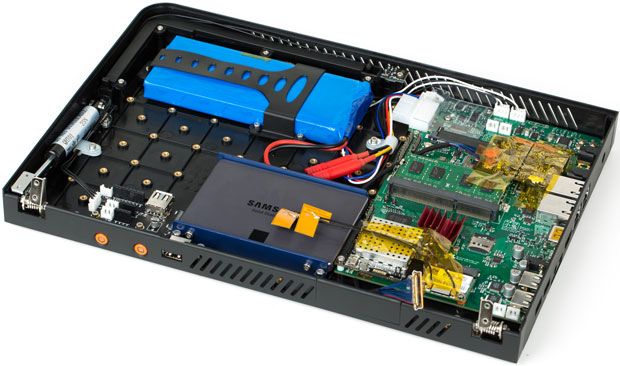
I’ll be flying all the way from Singapore to New York to participate in the Open Hardware Summit and Maker Faire next week. I’m giving a talk at the OHS titled “Why the Best Days of Open Hardware are Yet to Come”, and I’ll also be giving a talk at the Maker Faire on Sunday at 2:30PM officially introducing the NeTV (see also engadget/techcrunch/gizmodo). I’ll be posting more technical details on the NeTV here in the near future, so stay tuned.

I’ll also be participating in the OHS demo session, which will be the first time the public can try out an NeTV; and I’ll also have a small table at the Maker Faire where I’ll be recruiting developers and educating Makers on how to hack NeTV. The NeTV has a particularly high hack-value due to its integration of an FPGA; from the hacker’s perspective, it’s a cousin to the Rasberry Pi but with integrated wifi, HDMI pass-through and an FPGA. And a shiny plastic case for those who care about that!

Hope to see you there!

Some Pointers for Time Lapse Capture

Monday, August 8th, 2011

A couple of folks had requested a how-to on modifying the chumby One for video capture.

Unfortunately, I did this hack almost a year ago and took few notes on it, but I’ll post my fuzzy recollection here, and hopefully we can figure out any issues in the comment thread.

First thing to do is to pick a USB camera that’s compatible. That’s a little bit tricky because I don’t actually know why some cameras work and some don’t. The USB camera I used is one that is salvageable from a laptop — the camera board has a connector onto which I soldered the USB cable. I opted to use this because it’s a small, rectangular and flat board that’s easy to tape to a window (the ball cameras used for video conferencing are not as easy to tape in place). And it was free. I’d take a photo of the assembly except it’s taped to the window inside a cardboard baffle to reduce glare at night time from the indoor lights, and if I move it the video capture will shift. But, the video drivers compiled into the chumby One kernel are just the stock drivers taken straight out of the Linux source tree, so if it’s a camera known to work with Linux circa 2008 you’ll have a decent chance of it just working.

Next, you’ll need to grab mplayer and install it. A pre-compiled and statically linked version that just works with the chumby One can be downloaded here (the file is gzipped, you must unzip it before running it). mplayer is tricky and tedious to cross-compile, and the config files are long lost as xobs did the cross-compile for me. This particularly annoying barrier is being fixed for the future by migrating chumby’s new platform (which I hope to announce next month) to Open Embedded and providing developers with a pre-configured EC2 cloud image that will hopefully allow you to build and install packages with deep dependency trees with much less effort than previously required.

Once you have mplayer installed, try this script:

mplayer tv:// -tv driver=v4l2:width=1280:height=1024 -vo jpeg -frames 10

This will create 10 jpeg files in the directory that mplayer is located.

If this works for you, then you’re almost there.

The rest of the tweaks I’ll share are for getting around aperture-setting weirdnesses unique to my camera and the automatic photo taking. This particular camera has a problem where when you turn it on, it always starts with the aperture wide open, which means the first image is way over exposed. The following script represents close to the final arrangement for image taking:

#!/bin/sh
cd /mnt/storage
echo "running first pass"
mplayer tv:// -tv driver=v4l2:width=320:height=240 -frames 10

echo "running second pass"
mplayer tv:// -tv driver=v4l2:width=1280:height=1024 -vo jpeg -frames 10

echo "Resize a preview thumbnail so you can monitor image quality from the screen"
chumbthumb -x 320 -y 240 -i /mnt/storage/00000010.jpg -o /mnt/storage/resize.jpg

echo "show the image on the screen"
imgtool /mnt/storage/resize.jpg

echo "Give the JPEG a unique name and move to storage"
NOW=$(date +'%s')
mv /mnt/storage/00000010.jpg /mnt/storage/stills/${NOW}.jpg

The first pass exists to get around a bug where about 5% of the time, the camera would grab just a plain green screen. The second pass captures 10 frames and I only use the 10th frame captured because that’s empirically about how long it takes for the camera to adjust its aperture. A thumbnail is made, so that another script can toss an image on the LCD so you can monitor the quality of the camera. And finally, the image is given a unique name which is equal to the current time since epoch and moved to storage.

In order to set the timing for the image capture, the following crontab was used to call the above script once every 15 minutes:

chumby:/psp/crontabs# cat root
8 3 * * * /usr/chumby/scripts/sync_time.sh
30 * * * * /mnt/storage/take-image.sh
0 * * * * /mnt/storage/take-image.sh
15 * * * * /mnt/storage/take-image.sh
45 * * * * /mnt/storage/take-image.sh

In order to “guarantee” long term stability of the device, the actual implementation I used has the device rebooting itself after taking the image. There are a few quirks in the camera driver that are always solved by a reboot, and I didn’t want to have to worry about a quirk of the camera driver ruining frames. It’s been reliable enough for a year, most of the missing images are due to times when we knocked the power supply out of the wall while cleaning house and the battery ran out before we noticed.

The other thing is that the control panel that normally runs on a chumby gets in the way of showing your resized thumbnail (the chumby will show widgets that bash the image on the screen), so to disable it I created a /psp/rfs1/userhook2 file (userhooks are run during boot automatically in the chumby OS implementation) (don’t forget to give the script a+x permissions) with the following contents:


#!/bin/sh

start_network
imgtool --fb=0 --fill=0,0,0
imgtool --fb=1 --fill=0,0,0

imgtool /mnt/storage/resize.jpg

while true
do
sleep 1700
stop_control_panel
start_network
done

This ensures that the network is started (which is important to set/keep network time), and the script is designed to continuously call stop_control_panel and start_network just in case there is a connectivity issue that comes up (which would normally be fixed by the control panel, but since you’ve killed it you need to manage it yourself).

That’s about it. I get the files off by mounting a NAS over SMB and copying them, and I had a couple cgi-scripts that also let me preview the thumbnail via the web server built into the chumby, but these are really just embellishments, you can get quite fancy on the network copying part depending upon what you have or don’t have in your home LAN.

Oh, and finally — creating the video. With the files on the SMB share, I encode the video using a “real” PC with the requisite horsepower. I used mencoder, with these arguments:


opt="vbitrate=6400000:mbd=2:keyint=132:vqblur=1.0:cmp=2:subcmp=2:dia=2:mv0:last_pred=3"

mencoder mf://*.jpg -mf w=1280:h=1024:fps=12:type=jpg -ovc lavc -lavcopts vcodec=mpeg4:vpass=1:$opt -nosound -o /dev/null
mencoder mf://*.jpg -mf w=1280:h=1024:fps=12:type=jpg -ovc lavc -lavcopts vcodec=mpeg4:vpass=2:$opt -nosound -o output.avi

It’s a two-pass encode that creates a decently good looking stream with no sound.

Happy hacking!

A chumby-powered device for $49!

Saturday, December 4th, 2010

A reader has pointed out to me that Best Buy dropped the price of their 3.5″ Infocast to $49. That’s a crazy good holiday-season-only deal for an open-source, 454 MHz wifi-connected touchscreen linux computer!

The Cake is Not a Lie

Tuesday, November 30th, 2010

Congrats to Adam Gutterman for finding the cake. The cake is hidden on an internal ground layer, printed in “negative” (i.e., lack of copper on a copper plane). The visible-light photos I make of the motherboards are all taken with front-lit scanners, so the negative image is virtually invisible when viewed in that way. There’s also a solid copper ground plane behind the cake as well, so you can’t simply hold the board up to a light to find the cake (hence the larger bounty). The only two methods to find the cake are to either X-ray the board, or to mechanically delaminate the board using either knife or sandpaper (or both) to reveal the cake. And for the record, the region where the cake is located is electrically inert, such that defacing the chumby logo to reveal the cake does not damage the function of the device.

Adam tells the story of how he found the cake:

I’m an EE at a company that outsources almost all of our board assembly tasks. Anything more complicated than QFPs gets sent out–it’s not worth engineer time to assemble things, especially since we’re not particularly skilled assemblers.

Unfortunately, not all projects have the budget for professional installation. During a recent personal project, we hand-assembled a small batch of boards that had pretty tiny LGA packages. Our initial yields were pathetically low, and we suspected that there were some shorts to blame. Since we didn’t have a professional lab to use, we had to go with our personal connections. The board designer found a friend that had access to a medical x-ray machine, so we sweet-talked ourselves into a quick run through their machine. The resulting film let us get over our hump and bring our boards up successfully.

Anyway, as soon as I saw your post, I decided to do the same thing. Unfortunately, the x-ray office was closed for the long weekend, so I wasn’t able to get my ‘stat’ order in until Monday. When I got the films last night, the focus wasn’t clear enough for me to be able to make out any important features. The films, incidentally, are shown in the directory that I posted on your blog. Undeterred, I spent last night trying to get permission to use a PCB inspection facility at a local university. The okay came through this morning, so during lunch today a couple of us set the board up and started looking for features. It took only a couple of minutes to find the cake once we had access to the right equipment!

I didn’t think it would be found so quickly…just one week from original post, for an item that’s entirely concealed on an inner layer. Then again, ladyada got her open-source Kinect drivers in about the same period of time.

This is probably an interesting datapoint for folks who support the theory that burying traces on the inside of a PCB are an effective method for obscuring the transmission of secret information between chips.

Bitbake, Cake, and Black Friday

Tuesday, November 23rd, 2010

So, first the pitch — for your Black Friday shopping pleasure, here’s a couple of things that will help scratch that itch to play around with hardware.

First of all, two chumby-powered devices under the Insignia brand in Best Buy are on sale for Black Friday. The original 8″ Infocast device — an 800 MHz linux PC with an 8″ SVGA LCD and touchscreen — is rumored to be on sale for as low as $99 in some stores, although Best Buy’s on-line price pegs it at $129. Either way, it’s a smashing deal for a linux PC.

The other chumby-powered device is the 3.5″ Infocast, which you can think of as the Chumby One Internet Radio’s battery-less little brother. This, too, is on sale for Black Friday, and at just $79, it’s a steal.

The motherboard for the 3.5″ Infocast is shown below, and if it looks familiar, you’d be right.

One small improvement to the 3.5″ Infocast board is the addition of a “mod port” which breaks out several GPIOs, I2C, composite video, and a spare USB port to a 0.1″ pitch header (which is a subset of the pinout that’s featured in the chumby hacker board), shown below.

sudo find me a Cake!
So here’s where the Cake comes in. Somewhere on the motherboard of the Infocast 3.5″, I’ve hidden a cake — the cake is not a lie. The first person who can find the cake and post a photo of it within the next two months will be given a cash prize of US$300. Put in perspective, that’s two months’ wage for a Chinese factory worker (and that’s after the across-the-industry 20% raises that were effected by a string of suicides at Foxconn, where the iPhone is assembled). Given that the standard monthly prize for Name that Ware is just $10, this gives an idea of how hard I think it is to find the cake. But, I promise you — the cake is not a lie.

Bitbake it yourself!
And here’s where the Bitbake comes in. For those who have been wanting to build your own firmware for both the 8″ and 3.5″ chumby platforms, a simple solution finally exists. As announced on the chumby forum, there is now an easy to use Open Embedded configuration that will allow you to build and customize, from scratch, your very own firmware image.

You can configure the firmware to be anything from a minimal console-only build, to one that includes a window system and web browser of your choosing. The build configuration is “complete” in the sense that the product of the OpenEmbedded build is a binary image that you can directly write to the microSD card and boot with no need for further massaging.

Have a happy holiday weekend!